Download CameraFi Live free on android
APK file CameraFi Live 1.36.46.1113How to install APK / APKS / OBB file on Android


[App Description]
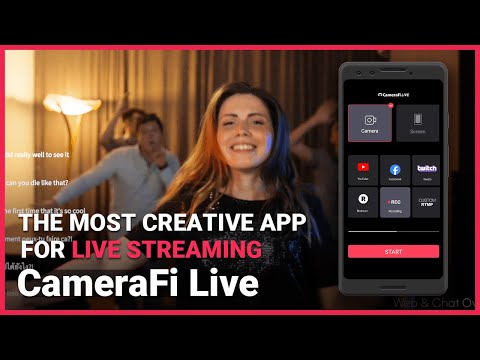
CameraFi Live is an app designed for recording and broadcasting, helping you create high-quality videos with your smartphone. With features like sports scoreboards, instant replays, and external camera connections, you can produce impressive sports videos and live streams effortlessly.
[Features]
* Camera and Screen Mode
Choose between Camera and Screen modes to either broadcast your camera shooting or smartphone screen.
* External Camera Connection
It supports external camera connection. You are able to live stream high-quality videos through clear shooting and zoom function using USB cameras with high performance (camcorder, DSLR, etc.).
* Instant Replay
The replay feature lets you highlight key moments during live streaming for better engagement. It can also be used during recording as a VAR tool or to check your posture.
* Image, Text, Video, Audio Overlay
You can easily add image/video/audio files while live-streaming. You can write the text overlay as well.
* Video Filter
Various video filters including emboss, mosaic, mono, cartoon will make your live stream eye-catching.
* Chat Overlay
You could interact with viewers by showing live chat. Also, Super Chat is supported.
* Web Browser Overlay
You can connect live-streaming donation/subscription alert platforms such as Streamlabs by web source overlay. Monetize your live broadcast.
* Motion Effect
Apply diverse cool effects to attract viewers. Motion effects from scoreboards to news graphics can be used in sports live-streaming, news reporting, etc.
* Picture in Picture (PIP)
You can show two video sources at the same time.
* Audio Mixer
Use free copyright music files as BGM(background music) for your live stream.
* Preset
Apply various overlays within a few clicks? Faster broadcasting preparation is available thanks to preset feature.
* Multiple shot
With a built-in smartphone camera, you can create multiple shots like you use several cameras.
* Multi-stream
You can broadcast to 30+ streaming platforms using Restream.
* Screen Capture Live (game live stream)
You can broadcast all kinds of game genres by using the front camera and built-in mic.
* Save a Live Video
You can save your live-streaming video in your smartphone memory to create a highlight video afterwards.
[Specifications]
* Compatible Android version
Android version 5.0 or above
* Streaming Server
YouTube, Facebook, Twitch, Restream(for multistream), RTMP, SRT(Secure Reliable Transport), and Recording
* Interfaces
- Video source: built-in Camera, USB Camera, capture cards (HDMI, SDI, CVBS) and Video files
- Audio source: Built-in Mic, USB microphone, Bluetooth microphone, Internal sound and Audio files
* Video Size
SD(640×480), HD(1280×720), FHD(1920x1080) ~ up to UHD(4K, 3840x2160)
(Varies from platforms and smartphone models)
* Encoder
H.264 and HEVC
[Required Permissions]
- READ_EXTERNAL_STORAGE: To get photos
- WRITE_EXTERNAL_STORAGE: To back up and restore statistics data
- RECORD_AUDIO: To record sound
- CAMERA: To capture photos or videos
[Optional Permissions]
- GET_ACCOUNTS: To obtain email address for activating All-In-One Serial Key
[Feedback]
If you have any comments or questions about the app, please send us email or visit our SNS channel.
- Home: https://www.camerafi.com/camerafi-live
- Blog: https://blog.camerafi.com
- Facebook: https://www.facebook.com/groups/camerafi
- Instagram: https://www.instagram.com/camerafi_
- YouTube: https://www.youtube.com/@CameraFi
- Email: apps.help@vaultmicro.com
• Added new scoreboard effects.
• Improved the running pace display and riding mode in the GPS overlay.
• Fixed touch focus and screen brightness issues, plus overall performance and stability.
- LicenseFree
- File nameCameraFi Live
- File Version1.36.46.1113
- Package namecom.vaultmicro.camerafi.live
- Size104.06 MB
- UploadedNovember 13, 2026
- Android6.0 or later

- CategoryVideo Players & Editors
- DeveloperVault Micro, Inc.
- Developer sitehttp://www.camerafi.com
- Developer emailapps.help@vaultmicro.com
- md5 hash65012350d3752418cfddf84a2c3b0433
- Architecturearm64-v8a armeabi-v7a
- Permissionsshow (29)
